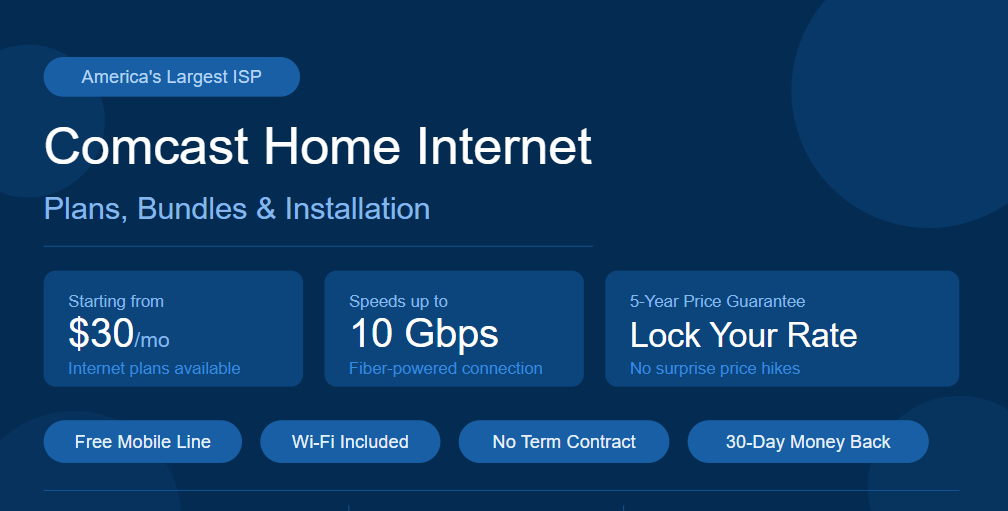
Comcast Home Internet: Plans, Bundles, and Installation
Comcast, also known as Xfinity, is one of the largest internet service providers in the United States. It offers a wide range of comast internet plans, bundles, and services for both home and business users. Whether you are looking for basic browsing or ultra-fast gigabit speeds, Comcast has a plan for almost every need and budget.
Comcast Home Internet: Plans, Bundles, and Installation
Comcast home internet runs on a cable network powered by DOCSIS technology. This means it delivers fast and reliable internet through coaxial cables directly to your home. It is available in most major cities and suburbs across the US.
Xfinity Internet Plans and Pricing
Below is a full breakdown of the current Comcast Xfinity home internet plans:
| Plan | Download Speed | Connection Type | Monthly Price | Key Deal |
| NOW Internet | Up to 500 Mbps | Cable | $30/mo | No contract |
| 300 Mbps | Up to 300 Mbps | Cable | $55/mo | 5-Year Price Guarantee + 1 Year Free Mobile |
| 300 Mbps + Mobile | Up to 300 Mbps | Cable | $40/mo | Xfinity Mobile Unlimited line for 1 year |
| 500 Mbps | Up to 500 Mbps | Cable | $70/mo | 5-Year Price Guarantee + 1 Year Free Mobile |
| 1000 Mbps | Up to 1 Gbps | Cable | $85/mo | 5-Year Price Guarantee + Free Mobile + 2 Years Peacock |
| 2000 Mbps | Up to 2 Gbps | Cable | $115/mo | 5-Year Price Guarantee + Free Mobile + 2 Years Peacock |
| 10000 Mbps | Up to 10 Gbps | Fiber | $299.95/mo | Fastest available plan |
Comcast Internet Bundles
Comcast offers three main types of bundles to help customers save money by combining services.
Internet + Phone Bundle
| Plan | Speed | Price | Includes |
| 500 Mbps + Unlimited | Up to 500 Mbps | $70/mo | Unlimited talk, text, and nationwide 5G |
Internet + Phone + TV (Triple Play)
| Plan | Speed | Price | Deal |
| 300 Mbps + Sports & News TV + Voice | 300 Mbps | $145/mo | 5-Year Price Protection + Free Mobile Line |
| 500 Mbps + Choice TV + Voice | 300 Mbps | $135.20/mo | 5-Year Guarantee + 1 Year Free Mobile |
| 1000 Mbps + Choice TV + Voice | 1 Gbps | $150.20/mo | 5-Year Lock + Free Mobile + 2 Years Peacock |
| 2000 Mbps + Choice TV + Voice | 1 Gbps | $180.20/mo | 5-Year Lock + Free Mobile + 2 Years Peacock |
Comcast Home Internet Installation
Comcast gives customers two installation options:
- Professional Installation: A trained technician visits your home and sets everything up. This option costs $100.
- Self-Install Plus: You install the equipment yourself with technician guidance available. This costs $39.99. Many plans include free self-installation kits with free shipping.
Equipment and Fees
When signing up for a Comcast home internet plan, keep these fees in mind:
- Equipment Lease Fee: Renting the xFi Gateway modem and router costs $15 per month.
- xFi Complete: For $20 per month in the first year, you get a free modem upgrade every three years and advanced security features included.
- Own Your Modem: You can buy your own compatible modem to avoid the monthly rental fee entirely.
Comcast Business Internet: Plans, Speed, and Pricing
Comcast also offers dedicated internet services for businesses of all sizes under the Xfinity Business brand. Business internet plans come with faster speeds, stronger reliability, and dedicated customer support compared to residential plans.
Why Choose Comcast Business Internet
- Faster upload and download speeds for business operations.
- 99.9% uptime reliability guarantee.
- 24/7 dedicated business customer support.
- Static IP address options available.
- Security features included to protect business data.
Comcast Business Internet Plans
| Plan | Download Speed | Best For | Connection |
| Business Starter | Up to 200 Mbps | Small offices, 1–5 users | Cable |
| Business Standard | Up to 400 Mbps | Growing teams, video calls | Cable |
| Business Performance | Up to 1 Gbps | Large offices, heavy data use | Cable |
| Business Gigabit Pro | Up to 2 Gbps | Enterprises and data-heavy operations | Fiber |
Business Bundles and Add-Ons
Comcast Business also offers bundle options that include:
- Business Voice: Unlimited nationwide calling with advanced call management.
- Business TV: Live TV packages for waiting rooms, lobbies, or break rooms.
- Security Edge: Cloud-based cybersecurity protection for all connected devices.
- Static IP: Available for businesses that need consistent IP addresses for servers or remote access.
Key Benefits of Comcast Business Internet
- Equipment included with most plans.
- Option to add a backup connection so your business stays online even during outages.
- Scalable plans that grow with your business needs.
- Access to millions of Xfinity Wi-Fi hotspots across the US for employees on the go.
Comcast Xfinity Low Income Internet: Affordable Plans and Eligibility
Comcast understands that not everyone can afford standard internet prices. That is why they offer specially priced plans for low-income households through the Internet Essentials program.
What Is Internet Essentials
Internet Essentials is Comcast’s long-running program designed to bring affordable internet access to qualifying low-income families and individuals. It has connected millions of Americans to the internet since its launch.
Internet Essentials Plans and Pricing
| Plan | Speed | Monthly Price | Best For |
| Internet Essentials | Up to 50 Mbps | $14.95/mo | Basic browsing and email |
| Internet Essentials Plus | Up to 100 Mbps | $29.95/mo | Streaming and remote learning |
Who Qualifies for Internet Essentials
To be eligible for the Internet Essentials program, you must meet at least one of the following criteria:
- Qualify for public assistance programs such as the National School Lunch Program, housing assistance, Medicaid, SNAP, SSI, or Federal Public Housing Assistance.
- Have at least one child enrolled in a qualifying school.
- Not have subscribed to Comcast internet within the last 90 days.
- Have no outstanding debt to Comcast that is less than one year old.
Additional Perks for Internet Essentials Customers
- Access to free digital literacy training and resources.
- Option to purchase a low-cost computer for under $150.
- Free installation in many cases.
- No credit check required to sign up.
Comcast Near Me: Find Local Stores and Service Areas
Finding a Comcast Xfinity store or checking service availability in your area is simple and straightforward.
How to Find a Comcast Store Near You
- Visit the official Xfinity website and use the store locator tool by entering your zip code.
- Use Google Maps and search for “Xfinity store near me” to find the closest location.
- Call the Comcast customer service number to ask about nearby store locations.
What You Can Do at a Comcast Store
When you visit a local Comcast Xfinity store, you can:
- Sign up for a new internet, TV, or phone plan.
- Pay your bill in person.
- Return or exchange equipment.
- Get help troubleshooting your service.
- Upgrade your current plan or equipment.
- Pick up a self-install kit.
Checking Comcast Service Availability in Your Area
Comcast Xfinity is available in 40+ states across the US. To check if service is available at your address:
- Enter your home address on the Xfinity website.
- Call Comcast customer service and provide your address.
- Ask a local Xfinity store representative to verify availability.
States Where Comcast Xfinity Is Available
Comcast Xfinity services are widely available across many US states, including but not limited to:
- California, Florida, Texas, Illinois, Pennsylvania, New York, Georgia, Michigan, Washington, Oregon, Colorado, Maryland, New Jersey, Virginia, and many more.
Comcast Internet Reviews: Speed, Reliability, and Value
Understanding what real customers say about Comcast internet helps you make a better decision. Here is an honest overview of how Comcast performs across key areas.
Speed Performance
Comcast Xfinity consistently delivers strong download speeds. Real-world average speeds are close to 450 Mbps, which is well above the national average for cable internet. Plans go up to 1.2 Gbps for residential users and even higher for business customers.
Reliability
- Comcast uses a hybrid fiber-coaxial network, which is more stable than DSL or satellite.
- The network performs well during peak hours compared to many competitors.
- Occasional outages do occur, but Comcast provides tools to track and report them quickly.
What Customers Like
- Wide availability across the US.
- Fast and consistent download speeds.
- Flexible bundle options.
- Useful features like the xFi app for managing your home network.
- Generous deals for new customers.
What Customers Dislike
- Prices can increase after the first year if not on a price-lock plan.
- Equipment rental fees add to the monthly cost.
- Customer service wait times can sometimes be long.
- Data caps apply on some plans unless you add xFi Complete.
Comcast Outage Map: Check Real-Time Service Disruptions
When your Comcast internet goes down, the first step is to check if there is a known outage in your area using the Comcast outage map.
What Is the Comcast Outage Map
The Comcast outage map is an official real-time tool that shows current service disruptions and outage areas across the US. It updates automatically as reports come in from customers and network monitors.
How to Access the Comcast Outage Map
- Sign in to your Xfinity account on the official website.
- Navigate to the Support section and select “Check Outage Status.”
- The map will display your area and show whether an outage is affecting your service.
- You can also check outage status through the Xfinity My Account app on your smartphone.
What the Outage Map Shows
- Your current service status.
- Any active outages in your zip code or neighborhood.
- Estimated time for service restoration.
- Type of service affected such as internet, TV, or phone.
Tips for Using the Outage Map
- Always check the outage map before restarting your equipment, as restarting will not fix a network-wide outage.
- Enable outage notifications in your Xfinity account to receive automatic text or email alerts.
- If your area is not showing an outage but your service is still down, it may be a local equipment issue.
Comcast Internet Outage: How to Report and Get Updates
Internet outages can be frustrating, but Comcast offers several easy ways to report a problem and stay updated on the fix.
Common Causes of Comcast Internet Outages
- Severe weather such as storms, high winds, or flooding.
- Scheduled maintenance or network upgrades.
- Physical damage to cables or equipment.
- High traffic overloading local network nodes.
- Power outages affecting network infrastructure.
How to Report a Comcast Internet Outage
Step 1: Check the outage map first to confirm whether a known outage exists in your area.
Step 2: If no outage is listed, restart your modem and router by unplugging them for 30 seconds and plugging them back in.
Step 3: If the issue persists, report it through one of the following methods:
- Xfinity My Account App: Go to the Support tab and select “Report an Issue.”
- Online Chat: Use the live chat feature on the Xfinity support page.
- Phone: Call Comcast customer service to speak with a technician.
- Text: Text “HELP” to 266278 (COMCST) from your registered mobile number.
How to Stay Updated During an Outage
- Turn on text notifications in your Xfinity account settings.
- Check the Xfinity Status Center regularly for restoration updates.
- Follow the official Xfinity social media pages for major outage announcements.
- Use the Xfinity My Account app for real-time push notifications.
Comcast Customer Service Phone Number: Quick Support Guide
Getting help from Comcast is straightforward once you know the right numbers and support channels to use.
Comcast Customer Service Phone Numbers
| Department | Phone Number | Hours |
| General Customer Service | 1-800-XFINITY (1-855-297-0039) | 24/7 |
| Xfinity Business Support | +1 (855) 297-0039 | 24/7 |
| Accessibility Support | +1 (213) 852-1858 | 24/7 |
| New Service or Sales | 1-855-297-0039 | Mon–Sat, 7am–9pm |
What You Can Get Help With by Phone
- Billing questions and payment issues.
- Technical support for internet, TV, or phone service.
- Plan upgrades or downgrades.
- Scheduling a technician visit.
- Reporting an outage or service disruption.
- Cancellation or account changes.
Tips for Faster Phone Support
- Have your Comcast account number ready before calling.
- Call during off-peak hours such as early morning or mid-afternoon for shorter wait times.
- Use the automated phone menu to navigate directly to the department you need.
- If you prefer not to wait, choose the callback option when available.
Comcast Xfinity Contact Phone: Reach Support Anytime
Beyond the main customer service number, Comcast Xfinity offers multiple contact methods so you can always get the help you need.
All Ways to Contact Comcast Xfinity
| Contact Method | Details | Best For |
| Phone | 1-800-XFINITY | Billing, technical issues, account changes |
| Live Chat | Available on Xfinity support page | Quick questions, troubleshooting |
| Xfinity My Account App | Available on iOS and Android | Self-service, outage reports, bill pay |
| Text Support | Text “HELP” to 266278 | Simple issues, outage alerts |
| In-Store Visit | Find nearest store using zip code | Equipment swap, in-person help |
| Social Media | Official Xfinity pages on major platforms | General inquiries and updates |
Xfinity Assistant
Comcast also offers an AI-powered virtual assistant called the Xfinity Assistant. You can access it through the Xfinity website or app. It helps with:
- Troubleshooting internet and TV issues.
- Checking your bill and payment history.
- Restarting your equipment remotely.
- Scheduling a technician appointment.
- Answering general plan and pricing questions.
Best Times to Contact Comcast Xfinity Support
- Least busy hours: Early mornings between 7am and 9am, or mid-afternoon between 2pm and 4pm on weekdays.
- Busiest times to avoid: Monday mornings and evenings after 6pm.
- For non-urgent matters, using the live chat or Xfinity Assistant is often faster than waiting on hold.
Final Thought
Comcast Xfinity remains one of the most widely available and feature-rich internet providers in the United States. Whether you need a simple home plan, a business solution, affordable low-income access, or reliable customer support, Comcast offers options to match every situation. Choosing the right plan and knowing how to reach support ensures you get the best possible experience from your Comcast internet service.